
Choosing a dash cam: recording, night vision and storage
In this guide
A dash cam earns its place by recording the one minute that matters and keeping the file until you need it. So the checklist is short: does it cover the front and the rear, can it read a plate at night, does it keep recording over old files, and can you get the footage off without a laptop.
Front only, or front and rear
A single front camera records the view ahead. It does not record a shunt from behind, or anything that happens behind the car while it is parked. A two-channel kit adds a second camera for the rear window and records both views at once.
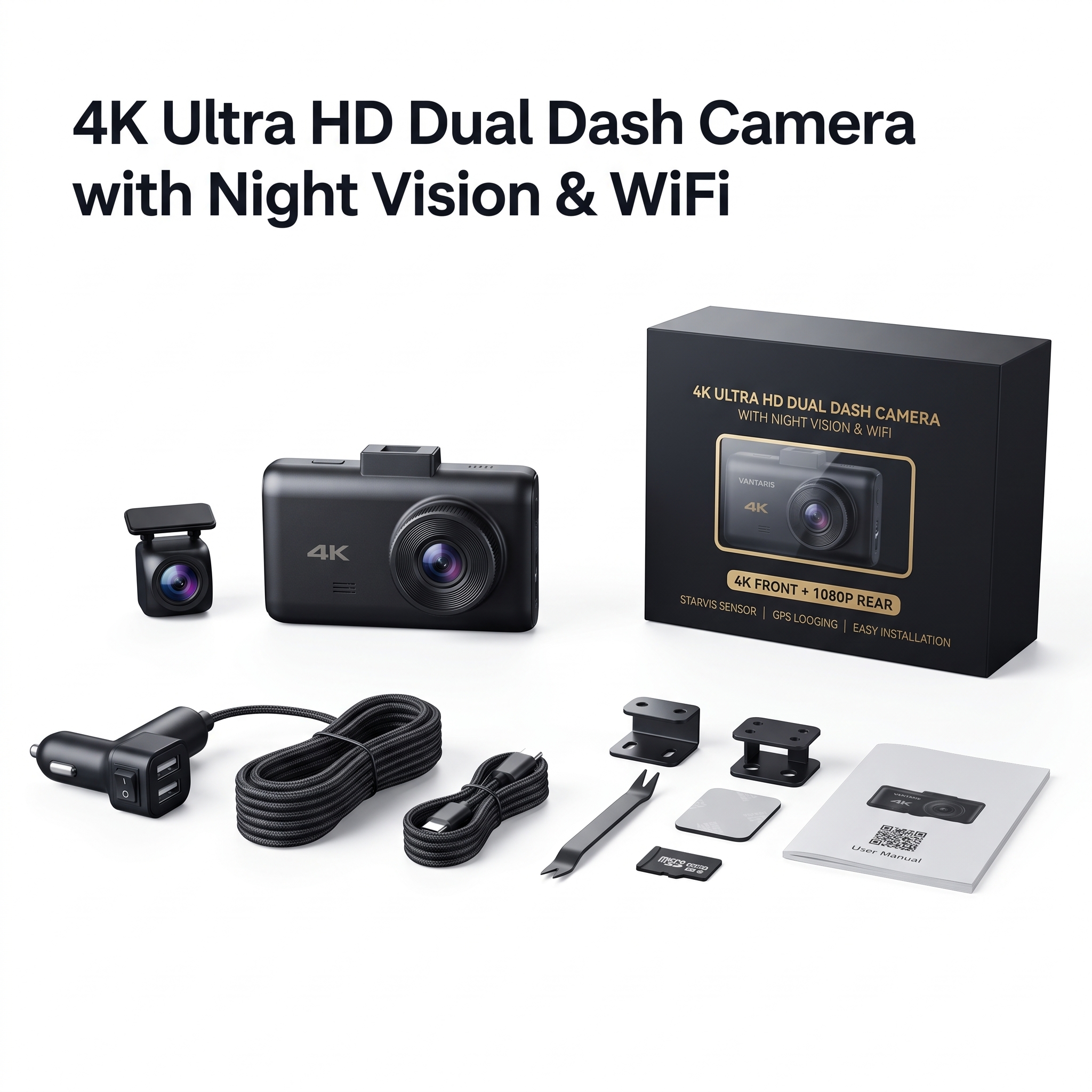
A second camera means a second cable run to the back of the car, so decide who is fitting it before you buy. Our dual camera kit is listed as a 4K UHD front camera with a 1080P rear camera.
Resolution: what the number actually buys you
Resolution is the number of pixels in each frame. 4K is 3840 × 2160 and 1080P is 1920 × 1080, so a 4K frame holds four times as many pixels. That matters for small detail: INF104 sets the characters on a UK plate at 79mm high, which is a small target a few car lengths away. Our listing describes the kit as recording licence plates clearly day and night.
Check the split between the two channels rather than assuming they match. On our kit the front camera is 4K and the rear is 1080P.
Night vision and low light
A camera that only records well in daylight misses every journey made after dark, so night performance is the second thing to check.
Our kit is listed with a Sony STARVIS sensor and night vision. The practical test for any camera is to look at sample night footage at the resolution you plan to use, rather than judging from a daytime clip.
Loop recording and parking mode
Loop recording means the camera records over its oldest footage once the card is full, so it does not stop for lack of space. Our kit lists it. The question to ask of any camera is how it keeps the clip you need from being recorded over, and the instructions are the place to check.
Parking mode is the other feature to look for if the car sits on a street. Our kit is listed with a 24/7 G-sensor parking monitor. The listing does not say how the camera is powered while the car is parked, so confirm that before you rely on it.
Storage, and how the footage comes off
Footage has to leave the camera somehow. On our kit the route is WiFi: the product page says the link lets you play back footage on your phone, which helps if you ever need to show what happened.
The kit is also listed with GPS logging, and the product page advises checking the memory card now and then and formatting it as the instructions say. The listing does not give a card size, so check the capacity before you buy: with loop recording, the card decides how far back the footage goes.
Fitting it without a mess
The product page gives the fitting in one line: mount it on the windscreen, connect it to the power supply and let it record your journeys. Choose a position where the camera does not block your view of the road, and tuck the cable out of the way rather than leaving it across the dash.
Keep the windscreen clean where the camera looks through it. A smeared screen is recorded as a smeared screen.
Key points
- •Decide between a front camera and a front-and-rear kit first.
- •A 4K frame holds four times the pixels of a 1080P frame.
- •Check the resolution of each channel; ours is 4K front and 1080P rear.
- •Judge night performance from night footage, not a daytime clip.
- •Loop recording keeps the camera recording when the card is full.
- •Confirm how the camera is powered before relying on parking mode.
- •WiFi playback puts the footage on your phone.
- •Mount it where it does not block your view of the road.
Questions people ask
Is 4K worth it on a dash cam?
It gives you four times the pixels of 1080P in each frame, which is what small detail such as a registration plate needs. Whether you need it depends on how much of that detail you want to keep.
Do I need a rear camera as well as a front one?
A front-only camera records the view ahead and nothing else. If you want a record of what happens behind the car, on the move or parked, you need the rear channel as well.
How much footage does a memory card hold?
It depends on the card and the recording resolution, and our listing does not state a card size. Loop recording is why the camera keeps going either way: it records over the oldest footage when the card is full.
Can the camera record while the car is parked?
Our kit is listed with a 24/7 G-sensor parking monitor. The listing does not say how the camera is powered when the car is parked, so confirm that before relying on it.
Where should I mount a dash cam?
On the windscreen, where it does not block your view of the road. The product page says to mount it on the windscreen and connect it to the power supply; keep the cable tucked away rather than across the dashboard.
The dash cam goes in the same basket as your plates, and delivery costs are shown before you pay. Our everyday car kit list covers what else is worth carrying, and the driver essentials page lists the full range.
Sources
GOV.UK: Displaying number platesDVLA rules on how a plate must display the registration, including character size and spacing.https://www.gov.uk/displaying-number-platesDVLA leaflet INF104: vehicle registration numbers and number platesCharacter height, width, stroke, spacing and margins for UK number plates.https://www.gov.uk/government/publications/vehicle-registration-numbers-and-number-platesKeep reading
Ready to Customise Your Plate ""?
Try 3D Gel, 4D 3mm Laser, and 4D 6mm Standout styles in our live interactive studio.